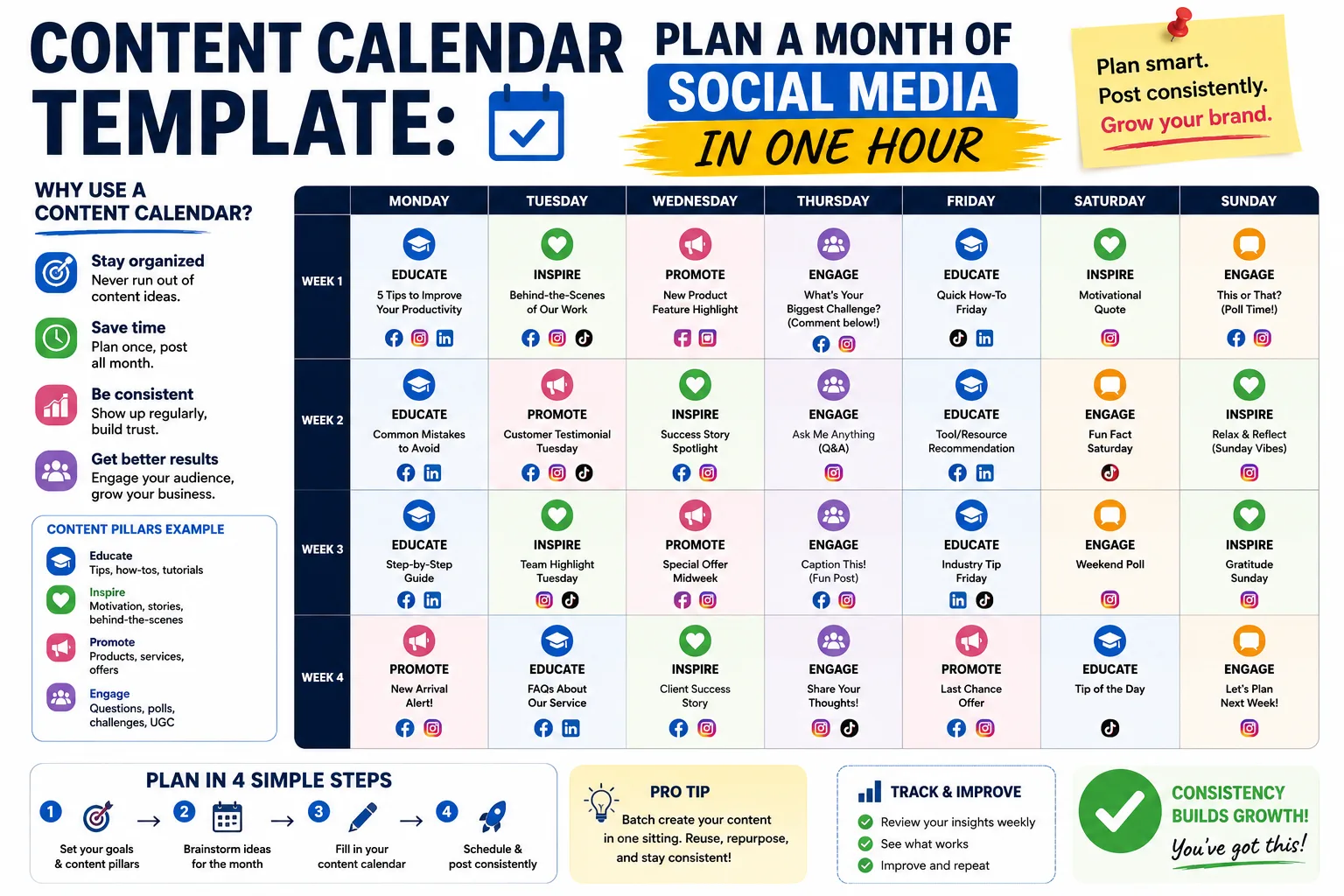
Content Calendar Template: Plan a Month of Social Media in One Hour
If you're posting on social media "when you have time" or "when you think of something," you're not marketing — you're improvising. And improvisation might keep your page alive, but it won't grow it.
A content calendar changes that. Instead of staring at a blank post composer every morning wondering what to say, you sit down once a month and plan everything. Then you just execute.
The best part? It only takes an hour. Here's the exact system I use for my clients.
Why You Need a Calendar (Even If You're Small)
Posting randomly has three big problems:
- Inconsistency kills reach. Social algorithms reward regular posting. Post 3 times one week and zero the next, and the algorithm forgets you exist.
- You run out of ideas. Without a plan, you'll burn out trying to think of "what to post today" — and end up posting low-quality filler.
- No strategy. Random posts don't build toward anything. A calendar ensures each post has a purpose.
The 4 Content Pillars
Before you fill in any dates, decide on your 4 content pillars — the broad themes you'll post about. This keeps your content focused and ensures variety.
For most Filipino small businesses, these work well:
- Educational (40%) — Tips, how-tos, industry insights. Positions you as an expert.
- Promotional (20%) — Your products, services, offers, customer testimonials.
- Behind-the-scenes (20%) — How you work, your team, your process, your story.
- Engagement (20%) — Questions, polls, relatable humor, community topics.
Pick 4 pillars that fit your business. A restaurant might use: Recipes, Menu Highlights, Kitchen Behind-the-Scenes, Local Food Community. A consultant might use: Tips, Case Studies, Working Life, Industry Questions.
The Calendar Template
Here's the format I use. You can copy this into a spreadsheet, a Notion page, or even a notebook.
| Date | Day | Pillar | Format | Caption/Idea | Status |
|---|---|---|---|---|---|
| Feb 1 | Mon | Educational | Carousel | "5 mistakes when hiring a freelancer" | Drafted |
| Feb 2 | Tue | Behind-the-scenes | Photo | Office setup tour | Scheduled |
| Feb 3 | Wed | Promotional | Video | New service launch | Idea |
| ... | ... | ... | ... | ... | ... |
Columns explained:
- Date / Day — when it goes live
- Pillar — which of your 4 themes (ensures balance)
- Format — Carousel, Reel, Photo, Video, Story, Poll, etc.
- Caption/Idea — what the post is about (doesn't need to be the full caption, just enough to remember)
- Status — Idea → Drafted → Designed → Scheduled → Posted
The One-Hour Monthly Planning Session
Here's how to plan a month in 60 minutes:
Minutes 0-10: Review Last Month
Look at your analytics. Which posts got the most engagement? Which flopped? Note the patterns. If carousels always outperform photos, do more carousels next month.
Minutes 10-25: Brainstorm 20 Post Ideas
Aim for 20 ideas — you'll post about 15-18 in a month, so 20 gives you buffer. Use these prompts:
- What are the top 5 questions customers ask me? (5 posts)
- What's one thing I wish my customers understood? (3 posts)
- What's happening in my business this month? (3 posts)
- What's a common myth in my industry I can bust? (3 posts)
- What's a customer success story I can share? (2 posts)
- What's a behind-the-scenes moment? (2 posts)
- What's a question I can ask my audience? (2 posts)
That's 20 ideas in 15 minutes.
Minutes 25-45: Assign to Dates
Open your calendar and drop each idea onto a date. Keep these rules:
- Post 4-6 times per week (don't post daily — you'll burn out)
- Alternate pillars so no two consecutive posts are the same theme
- Put promotional posts on Thursdays-Sundays (people buy more on weekends)
- Put educational posts early in the week (Mon-Wed, when people are in "work mode")
Minutes 45-60: Note Resource Needs
For each post, note what you need to create it:
- Photo to take
- Graphic to design
- Video to film
- Just text (easy!)
This tells you what to batch-create. You might realize you need to film 3 Reels — do them all in one afternoon instead of 3 separate days.
Weekly Batching (The Real Time-Saver)
Once your monthly calendar is set, batch your weekly execution:
Sunday evening (30 min): - Write the captions for the week's posts - Design any graphics (use Canva templates) - Schedule everything using Facebook's Creator Studio or Meta Business Suite
Then forget about it all week. The posts go live automatically. You just respond to comments as they come in.
This is the secret: calendar monthly, batch weekly, post daily.
Free Tools That Help
- Meta Business Suite — schedule Facebook + Instagram posts for free, up to 30 days in advance
- Canva (free tier) — design graphics from templates; the free version has everything you need
- Google Sheets — your content calendar (free, shareable, works offline)
- Notion (free tier) — if you prefer a more visual planner
Common Mistakes to Avoid
Mistake 1: Planning too far in advance. A month is the sweet spot. Planning 3 months out means your content gets stale and you can't respond to what's happening in your business or the world.
Mistake 2: No pillar balance. If 80% of your posts are promotional, people will unfollow. The 40/20/20/20 split keeps your feed valuable, not salesy.
Mistake 3: Forgetting Stories. Calendars usually plan feed posts, but Stories are where daily engagement happens. Plan to post 1-3 Stories per day — these can be more spontaneous (your morning coffee, a work-in-progress shot, a quick poll).
Mistake 4: Not leaving room for real-time posting. Don't schedule every single post. Leave 20% of your weekly slots open for spontaneous content — a trending topic, a customer shoutout, a behind-the-scenes moment that just happened.
Bottom Line
A content calendar isn't about being rigid — it's about being intentional. One hour of planning saves you 30 minutes of daily decision-making and makes your content dramatically better.
Pick a day this week. Block off 60 minutes. Use the template above. Next month, you'll wonder how you ever posted without one.
Want a free copy of my content calendar Google Sheet template? Send me a message and I'll share it with you — no email required.